
Snap it, upload it, find out what it isIdentify a Photo
Photo Identifier

Photo

Fill the frame with the thing you want identified, in good light.

Photo Identifier

Upload one photo and this photo identifier tells you what is in it: a name, how sure the AI is, a short explanation and close alternatives.

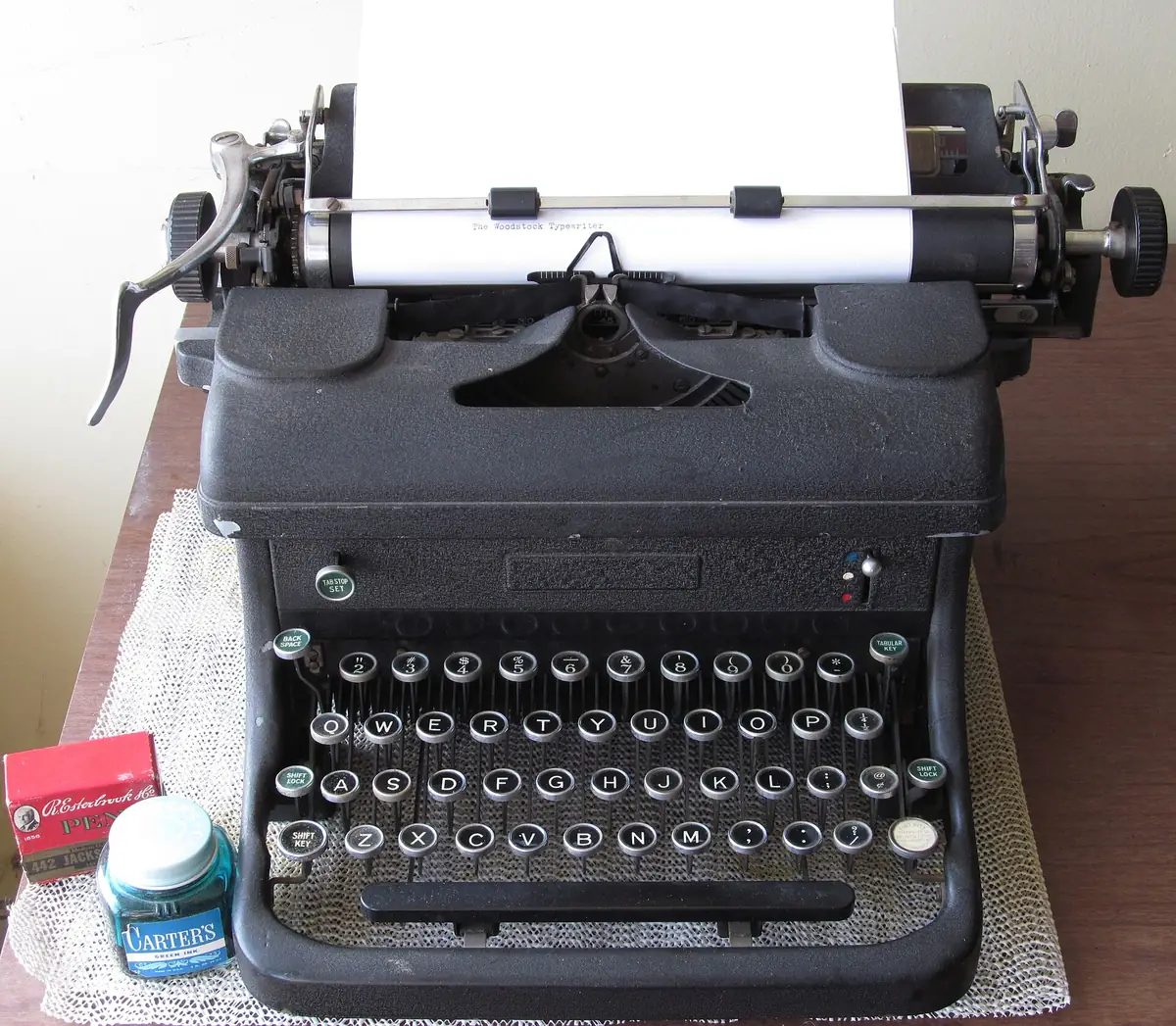
A vintage black typewriter on a desk, an example photo for the photo identifier
Example

Woodstock Standard Typewriter (Woodstock No. 5)

Office equipment · Mechanical typewriter

Confidence: 92%

This is a vintage Woodstock standard desktop typewriter, likely a Model 5 from the 1920s to 1930s with a crinkle-finish black frame. The paper in the carriage displays the typed text 'The Woodstock Typewriter', and the distinctive open front frame and round glass keytops are classic hallmarks of the brand.

History & Origin

Manufacturer
Woodstock Typewriter Company
Country of origin
United States (Woodstock, Illinois)
Production era
1914–1950 (Model 5 circa 1920s)

Design & Features

Finish
Black crinkle / wrinkle enamel
Keyboard
4-row QWERTY with glass keys
Type
Manual desktop standard

Quick Facts

  • Woodstock typewriters were famously manufactured in Woodstock, Illinois, which dubbed itself 'Typewriter City'.
  • A Woodstock typewriter played a central role as evidence in the infamous 1949 Alger Hiss perjury trial.
  • The company's machinery was later sold to R.C. Allen in 1950, which continued manufacturing typewriters based on Woodstock designs.

Did you know?

During World War II, the Woodstock Typewriter Company temporarily halted typewriter production to manufacture bomb parts and artillery shells for the U.S. war effort.

It could also be

  • Underwood No. 5 Typewriter15%
  • Remington Standard Typewriter10%
  • Royal 10 Standard Typewriter5%

An example answer. Upload your own photo to identify it.

A vintage black typewriter on a desk, the sample photo the photo identifier named as a Woodstock Standard Typewriter

What This Photo Identifier Tells You

One photo in, one written answer out: a name, how sure the AI is, and what else it could be.

Upload a photo of something you can't name and the photo identifier looks for the main thing in it: an object, a plant, an animal, a dish, a landmark, a piece of art or a product. The answer card gives a name, the kind of thing it is, the AI's own confidence, a two or three sentence explanation, a few labeled details, quick facts and two or three look-alikes ranked below the top answer.

It is not reverse image search. A reverse image search looks for the same picture, or similar pictures, elsewhere on the web: where it was posted, who else uses it, a larger copy. This photo identifier does none of that. It reads what your photo shows and tells you what the thing is, so it also works on a photo you just took that has never been online.

The answer is AI output, so compare it with the thing in front of you before you rely on it.

Made for

  • Flea market and thrift shoppers
  • People clearing out a house
  • Travelers
  • Gardeners
  • Collectors
  • Parents answering a child's question

When an Image Identifier Comes in Handy

The everyday moments when you are holding something, or looking at it, and have no word for it.

  • A flea market or thrift find

    Photograph the odd brass gadget or the old machine on the table before you haggle. A name gives you something to search for, and the look-alikes show what else it might be.

  • A box from the attic

    Clearing out a relative's house turns up tools, kitchenware and keepsakes nobody can explain. One photo each in the photo identifier gets you a name to write on the label or to look up later.

  • A dish or fruit abroad

    Snap the plate or the market stall and ask the photo identifier what it is. The card names the dish or produce and adds a few facts about it, in English.

  • A part or a tool

    A spare fitting or a hand tool with no label is easier to replace once you know what it is called. Fill the frame with it and include any stamped markings.

  • A painting, statue or building

    Museum pieces, public sculptures and buildings are on the list of things the photo identifier is asked to name; the card adds a short explanation and quick facts.

  • When a dedicated page fits better

    For plants, mushrooms, rocks, coins, insects, dog and cat breeds, cars, shoes, brands, clothes and places, the site has its own page that returns the details that matter for that subject. They are linked below.

How to Identify a Picture in Three Steps

No account and nothing to install: the photo identifier runs in your web browser.

  1. 1

    Upload one clear photo

    Drag or pick a JPG, PNG, WebP or HEIC photo; it is resized in your browser before it is sent. Fill the frame with the thing, use good light, and keep labels, logos or markings in view.

  2. 2

    Wait while the AI looks

    A loading card steps through Upload, Features, Match and Done. An answer usually takes 10 to 20 seconds.

  3. 3

    Read the answer card

    Check the name against what you see, then the confidence and the look-alikes. Try another photo, or press Identify again to run the same one once more, which uses another free scan.

Why Use This Photo Identifier

What you get from one scan, shown on the typewriter answer you see beside the upload box.

  • A photo identifier answer, not a list of links

    Our sample typewriter photo came back as a Woodstock Standard Typewriter at 92%. The summary pointed to the open front frame, the round glass keytops and the words typed on the sheet in the carriage.

  • Look-alikes with their own scores

    Below the top answer, It could also be listed Underwood No. 5 at 15%, Remington Standard at 10% and Royal 10 at 5%. When the runners-up sit close to the top answer, take a second photo from another side.

  • A confidence number that means something

    Confidence is the AI's own estimate, not a tested accuracy. It is told to keep 90 and up for unmistakable cases and to go lower for blurry, partial or look-alike photos.

  • Details picked for the thing

    On this general photo identifier the AI chooses two or three detail groups that suit what it found. For the typewriter they were History and Origin, and Design and Features, with maker, era, finish and keyboard.

  • Free in your browser

    The photo identifier gives you five free scans a day, shared across every tool on the site, with no sign-up and no credit card. A scan that fails on our side is given back.

  • Your photo is not kept

    Your photo is sent to the AI model only to identify it; we do not save it or use it to train AI models. The answer stays on the page only, so copy what you need before you refresh.

Frequently asked questions

Yes. Upload one photo here and the photo identifier answers with a name, the kind of thing it is, how sure the AI is and a few look-alikes. It works on a photo you just took, not only on pictures that are already online.

Use the upload box at the top of this page. Each visitor gets five free scans a day, counted across the whole site and reset on the UTC day, with no account and no credit card.

Open the photo identifier in Safari, tap the upload box and pick the photo from your library. HEIC photos are converted to JPEG in the browser before they are sent, so there is no app to install.

This page can't speak for other products, but it does the same kind of job for one question: what is in this photo. It returns a structured answer card with a confidence score and ranked look-alikes rather than a chat reply.

No. It doesn't search the web for the same picture, its source or similar images. The image identifier looks at what the photo shows and names it; for where an image appears online, use a reverse image search engine.

There is no tested accuracy figure, so we don't quote one. Each answer carries the AI's own confidence and two or three alternatives; a low score or close runners-up means take another photo or check with someone who knows the subject.

The photo identifier names the main thing, the one that fills most of the frame. For something else in the picture, crop the photo or take a new one so that thing fills the frame.

No. The AI is told never to name a real person from their face and describes people in general terms instead. The site does not search for people.

The photo was too dark, too blurry or blank for the AI to see a subject. Try a sharper photo in good light with the thing filling the frame; that scan still counts toward the daily allowance.

No. It is a best guess from one picture, not an expert check, an appraisal or a test of whether something is genuine. Never eat, touch or treat anything based on the answer, and ask an expert where safety or money is involved.

No. If identification times out or fails with an error, the scan goes back to your daily allowance. An answer that says it could not tell what the photo shows still counts as a scan.

There is no download, export or saved history. The result stays on the page until you refresh or leave, so copy the text you want to keep first.

If the file cannot be read, try a JPG, PNG, WebP or HEIC photo. If it is too large, try a smaller copy of the same picture.